Showing posts with label The Preliminary Task. Show all posts

Friday, 8 January 2016

Sound Editing

Sound Editing

Diegetic Sound

After we had finished all of our editing, we were ready to synch all of the dialogue that we had recorded up with the footage. Unfortunately for us, we couldn't find it anywhere on the file. This meant that we had lip synch and record the dialogue to the video and put it in after. This wasn't too much of a problem, as there were only a couple of lines of dialogue. However, it did mean that there is extra work, and not everything was going be perfect. We did it in the end, and we think that you can't really notice, but we promise that we won't make that mistake again.

Once we had the diegetic dialogue, we imported it into the Final Cut pro project, and took a couple of minutes to match the lines to the mouth movement. as we did multiple takes, and we had a break between the dialogue, we took the best parts and put them in the sequence.

Non-Diegetic Sound

Now that the diegetic sound was included in the sequence, it was time to include the non-diegetic sound. We before this point, we hadn't really thought about what type of music that we wanted, but we did know that we wanted it to be dramatic so that it would fit the actions happening while the music was playing. In the end, we chose a piece of music that was an instrumental of 'Cry Me a River' by Micheal Bublé. It fitted perfectly, as the music calms as the dialogue begins, and picks up right after Mel had died.

After we had downloaded the music, we inserted it into Final Cut Pro, and cut it so that it would fit in the sequence. However, the non-diegetic music had drowned out the diegetic dialogue. Luckily this was easily fixed, as we were able to change the level of the music to be quieter while the dialogue was taking place, and we turned the level of the dialogue right up.

After this was done, we had decided that we were able to label the project 'done', as we were very happy with it. Unfortunately, we did not experiment with Foley, as we felt as if the project was good without it, and we were becoming scarce on time. However, Foley is something that as a group we will try in the future.

The Editing Process

The Editing Process

When we started our editing process, we started by uploading all of our Footage onto Final Cut Pro. However, we weren't quite observant enough to see that we could name each shot before they were on the system. Luckily, we were able to add in titles after they had been uploaded, which made life easier (In the future this is not a mistake we will make, as we have learnt our lesson). There was a silver lining though, as this gave us another opportunity to look through all of our shot, and made it easier to see what shots were better than others, and what order they would go in.


The first thing we did was refer to our storyboard, so that we were certain of what shots were in each
order, and how long each shot would last. Our first shot was a shot of Mel stirring the tea with a spoon. The first thing we did was play the video and collectively agreed on where the shot should start and where it should end, and we set those points as the the in and out point. After this was done, we dragged it into the live bar. We repeated this process with all of the clips.

As some of the shots that we did were intended to be 'Match on Action' and 'Shot/ Reverse Shot' some more refines editing was needed, as we had to cut a shot at a particular point so that it would connect with the next shot seamlessly. This was shown in one of the shots of Melissa reaching for the bottle and picking it up. In the first shot, we have a MLS of her arm extending across the table. Then in the next shot there is a CU of the bottle that se is picking up. In the shot before, we had to cut the shot before she actually picked it up.

One thing we found when we had found when we had edited all of the shots together, was that the overall time was a little over a minute. This was likely due to the fact that when we were filming, some extra shots between what we had planned would look better. Similarly, we found that some shots weren't needed. To fix this, we decided to slim down on some shots with seconds that weren't needed. An example of this was the first shot of the tea being stirred, and another was the shot of Melissa walking across the room with the tea. In the end we didn't think that it made a difference, and it made the product a more sensible time.


Once all of the clips were together, we started thinking about transitions, and which ones would look effective in the movie. In the end we decided that in the duration of the film, that cuts would look better as it would not distract the viewer from the story. However, we decided that a fade into the sequence, and a fade to end it would look effective, and so we added them into the beginning and end of the film.


The last thing that we did was delete all of the audio that had been uploaded with the video footage, as we did not need it anymore to hear the markers, and we had recorded the dialogue separately. This meant that there was a clean slate for the sound editing to take place.


The Filming Process

The Filming Process

Setting up the Equipment


It was a team effort when we set up the equipment. We used a Tripod to mount the camera on, and we used a lighting stand so that we could get even lighting in each shot throughout all of the filming. When we were setting up the equipment, we all took one of the items and set them up in the appropriate place, so that we could start filming.


Before we mounted the camera, we set the white balance so that we knew that the lighting would be the same in every shot. We took a test shot so that we knew that there was nothing wrong with the camera, and that we wouldn't be filming blanks (also to make sure that we actually knew how to use the camera).

Once we mounted the camera, we adjusted the tripod in order to get the framing that we wanted. This took some team work as we loosened the legs of the Tripod so that we could get the angle that we wanted. This proved to be more difficult than we thought, as we were filming from a high angle, which meant that all of the legs were at a different lengths.

After we had done all of our recording in our first location, we had to move all of our equipment to the second one. Luckily that wasn't too far from the first location, and did not take a lot of time. One thing we had to do was move props so that it would fit the scene. This meant moving a couple of tables and chairs, but it wasn't too much of a taxing job.

When we had all of the equipment set up, we started our second scene. This however, need the sound equipment to be used as well, as there was dialogue in this scene. So we set up the sound recorder and put it in a place where you were not able to see it in the shot.

As this was dialogue scene between two people, we had to use shot reverse shot that we would later do in the editing. This also meant that we had to record the scene a couple of times with shots focused on both characters. For the shot focusing on Tash, we has an over shoulder shot where the camera was placed behind Mel, and you can see the top of her head. The other shot was of Mel, and we had a close up of her.

The final shot was of Mel dying and spilling over her tea. This was an interesting shot, but it caused some shock to Tash, who unfortunately go tea on her clothes, and to Mel, who felt bad for getting Tea on her c
lothes, but we got enough footage to be able to cut out that part.

We ended our shoot by clearing up the tea, and putting away the equipment, that we brought back to the Media Techs, and uploaded our footage to the Mac system, ready for editing.

Our Finished Product

Our Finshed Product

Here is our final video that we have created after all of the planning, filming and editing. Enjoy!


Thursday, 7 January 2016

Filming Process Evaluation

Filming Process Evaluation

What went well during the filming process

One of the things we did well during our filming process was how quickly we moved between shots. Despite the fact that we had a lot of equipment to move and all of the different angles that we had to adjust the Tripod into, we managed to do this efficiently by all of us moving pieces of equipment into a new location, rather than one person doing all of the work. This meant that there was less time wasted with shuffling and more time used for filming, which was a more productive use of our time.

Another thing that we did well, was all of the waste footage we had. When we took a shot, we made sure that we had multiple takes. This meant that we had a big choice of what footage looks best next to each other. In addition to the extra shots we captured, we also made sure that we had enough waste footage either side of each piece. While this provided us with very funny moments captured on camera, it also meant that it made the editing process much easier as we were able to cut down the clip to the part that we wanted.

What didn't go so well during the filming process

 Our location was a very busy one. This meant that it was difficult to film in the ideal environment as we had to ask people to move out of the shot, we were never insured complete silence, which we needed in order to capture our dialogue, and our setting always changed as people kept on coming and going, which made continuity difficult. This meant that we had to adapt to the environment, which was added stress that we did not need.

Some of our shots were difficult to recreate.  The one shot in particular was the dropping of the tea cup - which contained tea in it. This meant that there was a lot of liquid to tidy up after the shot, as the tea went everywhere. In the end Mel had to ask the cashier for the industrial paper towels to tidy up the mess. it also meant that tea got on our clothes, that were going to be worn for the rest of the day.

Conclusion 
Overall, we think that the filming process was a success, as we did what we needed to do, and we did it effectively, which meant that we didn't have to spend too long on unnecessary things. We got all of the footage we needed, and we followed our storyboard really well. We also experimented with different shots and got comfortable with the camera, which gives us confidence for the main task, and more importantly, we all worked together well as a team. Also it was a very fun experience that is rewarding.

Friday, 18 December 2015

Storyboard

Storyboard


To create the Storyboard, we all sat and discussed the plot of the story. Once we came up with what we wanted to happen, Chayana drew a tile, adding in a description and distance. we decided and shifted the timings as we went along, and finalized it when we added up how long the sequence will last..
Storyboard Artist, Chayana, Making the storyboard


Here we have a picture of Chayana drawing the storyboard, and the 3 pages of the storyboard. Each window has got the duration of each shot, as well as the distance, dialogue and a description of what is happening in each shot.

Here is the first page of the storyboard. It includes the first 15 seconds of the piece

The second page of the storyboard includes some of the dialogue and the change in setting.

Tuesday, 8 December 2015

Pre- Production Planning

Pre-Production Planning

Identify coinciding non teaching periods on group members timetables-

All of the group members have agreed to meet at period five on Wednesday. We will also on non-teaching periods to continue with the work.

Organise a time to do filming-

We have arranged to film in period five on Wednesday.

Who is responsible for various aspects of Mise en Scene- props, locations, costumes, make-up-

All the group members are bringing props, costumes and make-up that is needed to film, we have all decided on a location as well. The location we have chosen is the Hub Cafe because it creates the cafe effect we're looking for, and we got permission for this.


For props, we used tea cups, tea, a spoon, and a small bottle, which Chayana will provide. Tash and Mel chose the outfit their outfits. Mel is going to wear black to show that her has ill intentions, and Tash will wear white to show her innocence.

Organise all equipment (camera, lighting, tripod, mics and sound recorders)-

As a group we are all going to collect the equipment and use what is needed for the scene being filmed.

Remind yourselves of White balance, Framing of subject, Making a sandwich-

White Balance


Conduct a risk assessment for your shooting locations-

The risk assessment will include:
Making sure that the location where we're filming isn't hazardous e.g. tripping over equipment or props.


For our location, we evaluated the area, and concluded that one of the main risks were the vast amount of chairs and tables on the shoot. This meant that it could be easy for us to trip. However, we are going to make sure that we clear the area. And when we move the tables, we will make sure that we have two of us doing the heavy lifting.

In our shoot, we are also going to be using hot water for the tea. This can cause us to be burnt, so we must handle with care, and make sure that we do not spill it.

Framing of Subject

Monday, 7 December 2015

Assigning of Roles

Assigning of Roles

Camera Operator - Tash

 As Tash does photography, we have appointed her as the Camera Operator. However, this job will also be shared among us, as Tash is one of the actors who we are filming.

Sound Recorder 

This job will be shared among us as it an easy job to do and will take little time to set up. Moreover, as two of us will be acting, the job will be given to whoever is not operating the camera, and who is not being filmed.


Storyboard Artist - Chayana

As Chayana is quite good at art, she is going to be the one to draw the storyboard. However, everybody will
help come up with the ideas for the shots and timings we might use.


Location Scout

This job will be share among us, as we need to all agree on a place to film, and we had been thinking of ideas before hand when we were given a task.


Prop's Manager

We are only using a hand-full of props in our film, but we will all contribute and be resourceful so we can get all on the props that we need.


Casting Director

As there are only two characters in our film, Mel and Tash are going to act, so we don't need to cast anybody else for to act in our film.


Director of Filming

As Chayana is the only one not being filmed she will the person who is mostly in charge, though everybody in the group will be apart of this process.

Shot Reverse Shot

Shot/Reverse shot


Shot/reverse shot is a media and film technique where one character is presented looking at another character in a scene, this is then reversed to where the other character is doing the same. The character is either looking at a person or sometimes an object. This technique is presented in an 'over the shoulder' shot or a 'point of view' shot.

This technique is often used to present the characters facial expressions and body language. For instance, when two characters are in an argument, shot/reverse shot allows the viewers to understand the characters emotions.


An example of shot/reverse shot is in this video here

An example of shot/reverse shot

Thursday, 3 December 2015

Match on Action

Match on Action

Match on action is a continuity technique that allows the viewer to see the same movement/action in two different angles, in a way that flows and is uninterrupted, to stop the viewer from losing any time. This usually includes an action starting in one shot, and finishing in the next. Common examples include somebody reaching for a door knob, and then a cut to the hand clutching the door knob, and then a last shot of the man walking through the door.walking through it.

This creates an illusion of continuity and gives the viewer more information, as it would be ineffective if each action was one shot at one distance. It also stops the viewer from having to watch the same clip several times to get the necessary information from the scene, as this interrupts the flow of action and the story. It creates a visual bridge that connects the scene seemlessly.

It also is a way to mask the cut that are made when editing, as the cuts also follow the flow of the movement, so the viewer doesn't notice it changing the distance/angle of the camera, which makes the whole scene flow smoother. You wouldn't get a match on action with a wipe, dissolve or fade.


This shouldn't be confused with the 'Graphic Match', which is when a shape or an image is a transition into the next scene to signify a motif.It also associated with the eyeline match, as it can finish the action of a character looking at an object, with a shot of a character turning their head, followed by a shot of what the character is looking at.

Tuesday, 1 December 2015

The 180 Degree Rule

The 180 Degree Rule 

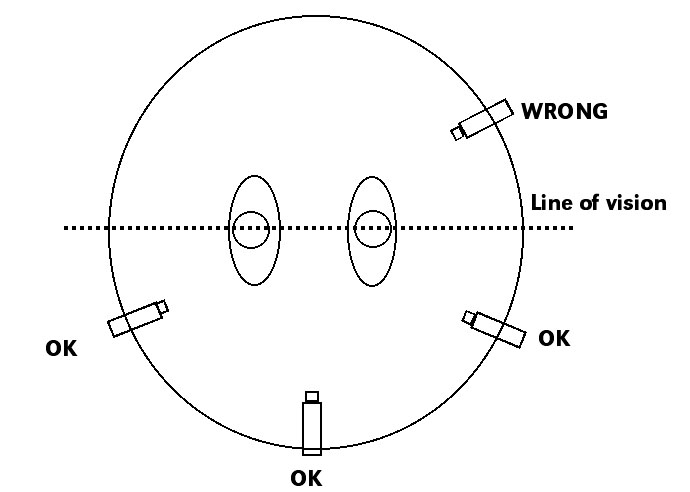
The 180 degree rule is extremely important technique to use in continuity editing. If two characters are talking face to face, for example, there is an imaginary line which runs through the middle of them as labelled as "Line of Vision" in Figure 1 below.
Figure 1
Whilst filming, any cameras used must all be placed on the same side of the line. This is because the characters will all be on the same side on every cut, meaning that the spectator can understand where the characters are and can focus on the story happening. If the rule is broken and a camera is placed on the other side of the Line of Vision, the characters switch sides which can be confusing and disorientating for the spectator if it is not used as part of the storytelling (Figure 2).
Figure 2
Breaking the 180 degree rule also breaks 'Eyeline Match', meaning that the characters in the example will look like they're talking to thin air rather than each other. This would make it unclear to the spectator about what the character is looking at or talking to and makes the storyline and dialogue hard to follow. Keeping to the rule allows the spectator to become more involved in the action happening on screen.

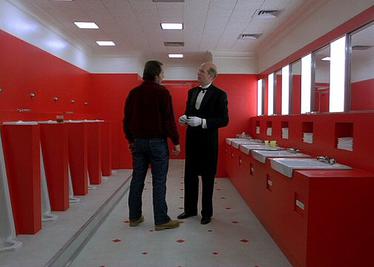
However, there are times when the 180 degree line can be crossed and the rule broken. For example, crossing the line in one continuous take means that the spectator is brought along with the camera, losing the disorientating effect because of the lack of cuts so there isn't an issue. Another time the rule can be broken is to purposefully create that disorientating effect on the viewer, especially when shocking news in the story has been revealed. For example, in the film 'The Shining', the switching of the sides showed the spectator that the two characters were the same people (as shown in Figures 3 & 4 below). 
Figure 3
Figure 4

The Preliminary Task

The specification states that this must be:

‘ A continuity task involving filming and editing a character opening a door, crossing a room and sitting down in a chair opposite another character with whom she/he then exchanges a couple of lines of dialogue.’ The sequence must last no longer than one minute.

This task should demonstrate:

  • Match on Action

  • Shot/Reverse Shot

  • The 180 degree Rule

You will also have to incorporate Music, lighting, dialogue (recorded separately on a lapel mic and voice recorder)  and sound effects into your film

All filming and editing must take place on campus, using College equipment.

Each group will set up a blog onto which you will record  the entire process